Dispatch answering service: the job lands in your techs' WhatsApp group
Call2Job is a dispatch answering service with an AI dispatcher on the line. It answers your calls 24/7, books the job inside your hours, service area and job rules, and posts it to your technicians' WhatsApp group within seconds of the call ending. The office gets the call on WhatsApp too.
Booked jobs go straight to your technicians' WhatsApp group. It's built into Call2Job, so there's no Zapier or Make to set up.
91% of calls on our agents ended as a booking or a saved lead (2,559 of 2,822 calls).
No charge for your first 20 calls. Card required.
On this page
- Watch a booked job reach the techs
- What answering service dispatch looks like with an AI dispatcher
- What the office gets vs. what the techs get
- A real call, then the job
- Resend from the dashboard
- Your rules decide what gets booked
- What a booked job looks like, trade by trade
- Live in less than 24 hours
- What it costs
- Common questions
Watch a booked job reach the techs

What answering service dispatch looks like with an AI dispatcher
For us, dispatch is the part between "the phone rang" and "a tech knows where to go." That gap is where jobs go cold. The caller gets booked, then the details sit in a voicemail, an email or someone's notes until the office catches up.
Our dispatcher does three things in order. It answers and talks the call through like someone who knows the trade. It books the job inside your rules, or takes the details for a callback when the job falls outside them. Then it sends two different WhatsApp messages: one to your office, one to your techs.
It does not pick a tech by location, skill or workload. It posts the job to the WhatsApp groups set for that agent, and your crew or your office decides who takes it.
What the office gets vs. what the techs get
The two groups need different things, so they get different messages.
| Office WhatsApp group | Technicians' WhatsApp group | |
|---|---|---|
| Which calls | All calls, or real calls only (your choice) | Booked jobs and callback requests |
| What's in it | Call outcome, job type, name, phone, address, job time, summary, "Open call" link | Job type, name, phone, address, job time, summary |
| Recording and transcript | One tap away through "Open call" in the app | Not in the message |
| When | Within seconds of the call ending | Within seconds of the call ending |
The office sees everything, including calls that didn't book, so nothing slips. The techs only see work. A tech on a roof doesn't need to read about a robocall or a wrong number. He needs the address, the job and a phone number he can tap.
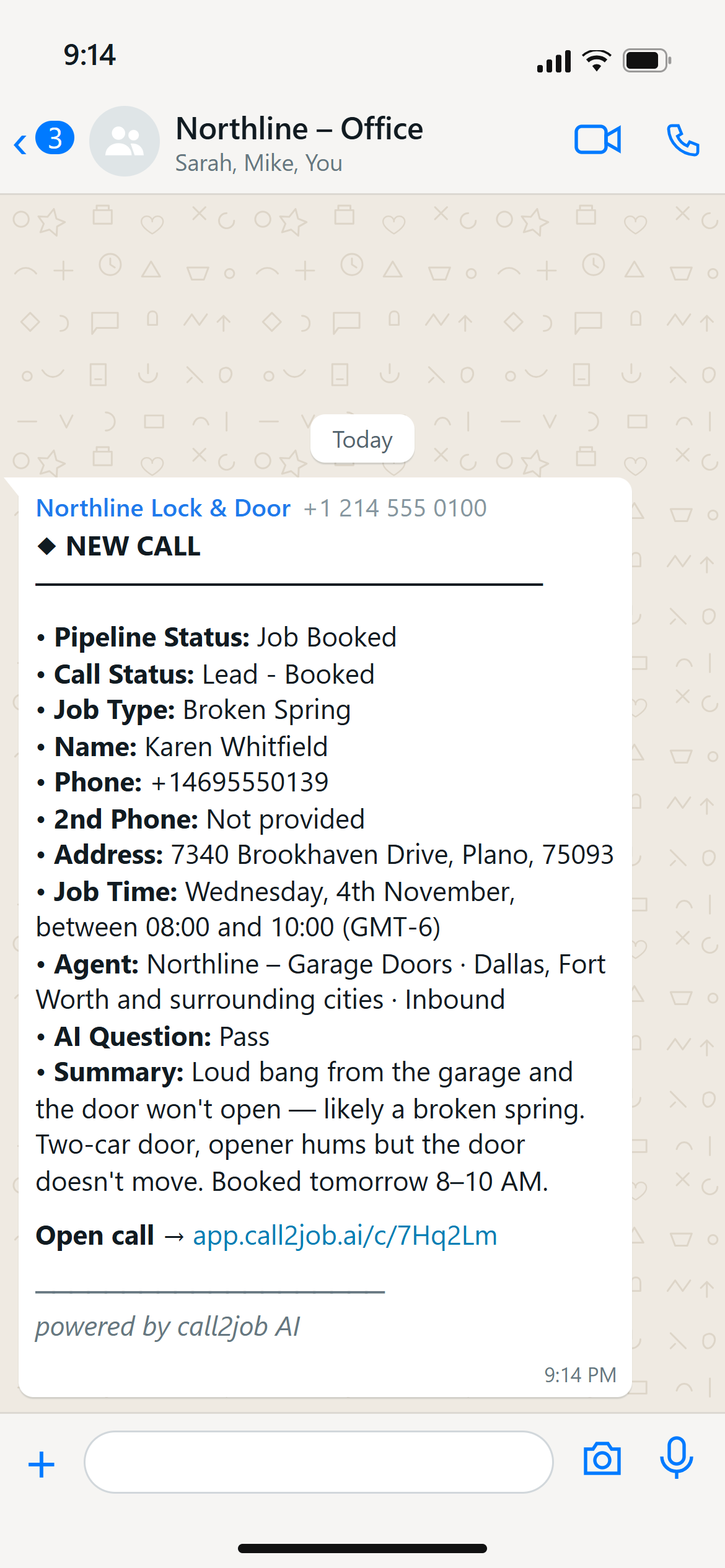
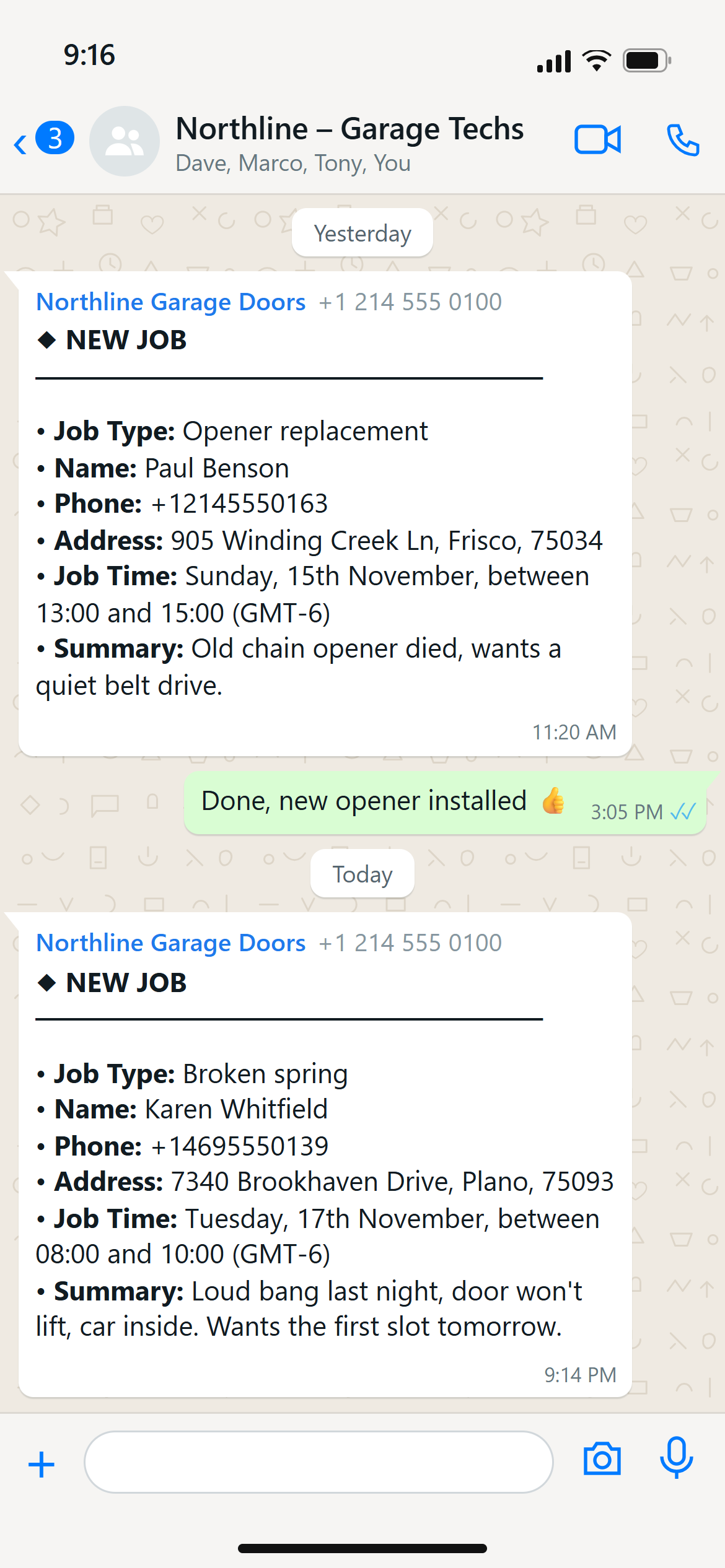
A booked garage door job as the tech group sees it. Demo data.
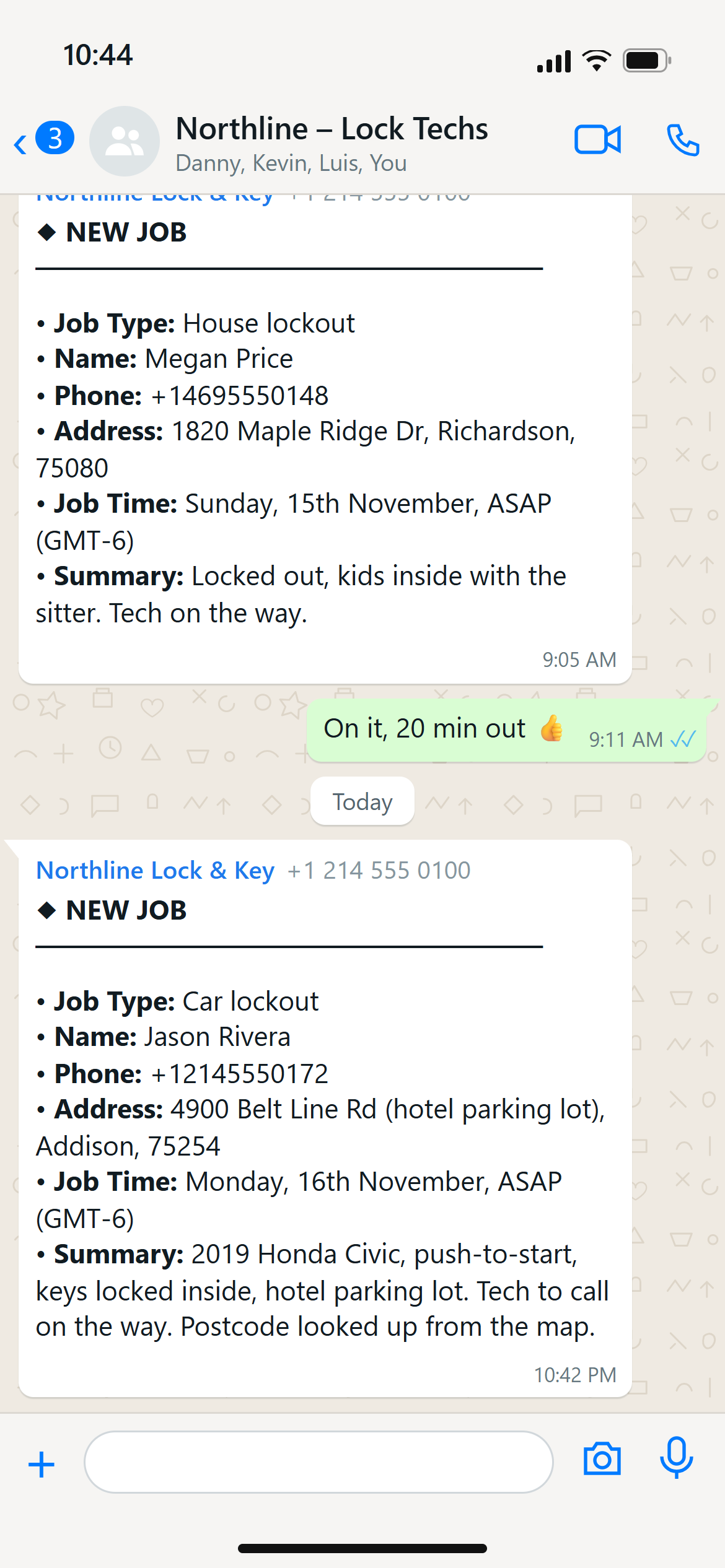
A booked locksmith job in the tech group. Demo data.
A real call, then the job
Here is what the dispatcher heard at 2:44 AM for a Calgary locksmith.
Real call · Locksmith · 2:44 AM
He was about to smash his car window. Booked before he hung up.
- AI receptionist
Locksmith service. Alex speaking. What can I help you
- Caller
Oh, hey, buddy. You actually answered. Nice. I I locked my keys in my car. Can you
- AI receptionist
your car right now? Sure. Go ahead.
- Caller
I'm at a hotel in the •••. I'm at the ••••• ••• on ••••• Trail in Calgary.
- AI receptionist
Got it. The ••••• ••• on ••••• Trail. Okay. So you need to get into your car. Is is it a push start or a standard key?
- Caller
It's standard key. I'm at the point where you can smash the window, it's a 2004 Dodge Magnum. Nothing fancy.
- AI receptionist
Got it. 2004 Dodge Magnum? Yeah. We can definitely handle that. You need someone right away.
- Caller
I I only have my debit card, though, if that's an issue.
- AI receptionist
No. That's fine. It didn't... The technician will go over payment with you when he gets there. We've got someone nearby who can usually be there within an hour or two. He'll call you in a few minutes to confirm exactly how quickly he can make it. What name should I put this under? Robert. Got it. And just to confirm, we'll call you back on the number you're calling from. Yeah?
- Caller
Yep. (403) •••-••••.
- AI receptionist
Got it. We'll call you on that number. So you're all set. We've got a technician heading your way at the ••••• ••• on ••••• Trail for your 2004 Dodge Magnum. He'll call you in a few minutes to let you know exactly when he'll be Is there anything else I can help
- Caller
It's it's the room... It's it's the the old ••••••. They don't have it labeled as a ••••• •••. So if you pull up, it's the ••••••. actually the ••••• •••. So just in case, but... Alright. I'll
- AI receptionist
I'll make sure that gets passed along. Is there anything else I can help you with?
- Caller
Nope. Unless you make them come faster. Nope. That's
- AI receptionist
Thanks. Have a good one.
- Caller
You too. Cheers. Bye.
The caller locked his keys in a 2004 Dodge Magnum outside a hotel. The AI asked the one question the tech needs before driving out: push start or standard key. It took the name, confirmed the callback number, and told him a tech would call in a few minutes.
It also caught a detail the caller added at the end, that the hotel sign shows an older name, and passed it along. The owner didn't wake up to take the call. The job was booked and sent to the app.
Watch the full callResend from the dashboard
Plans change. A tech calls in sick, a van breaks down, a message gets buried in the group. You can resend the job from the Call2Job dashboard. Every booked job sits there with its recording and transcript, so you can check what the customer said before you send it again.
One thing to know. WhatsApp replies are not read by the system. If a tech types "I'll take it" in the group, that's for your team. Call2Job doesn't act on it.
Your rules decide what gets booked
The dispatcher only books what you'd book yourself. You set it in simple settings and change it anytime in the app:
- Your hours, and what happens after hours.
- Your service area, so out-of-area callers don't become jobs.
- Which jobs it takes and which it turns down politely.
- Whether it takes emergencies after hours, and any emergency fee it mentions.
Calls outside those rules become a callback request, with the details already taken. Callback requests reach the office and the techs' group. No prompts to write.
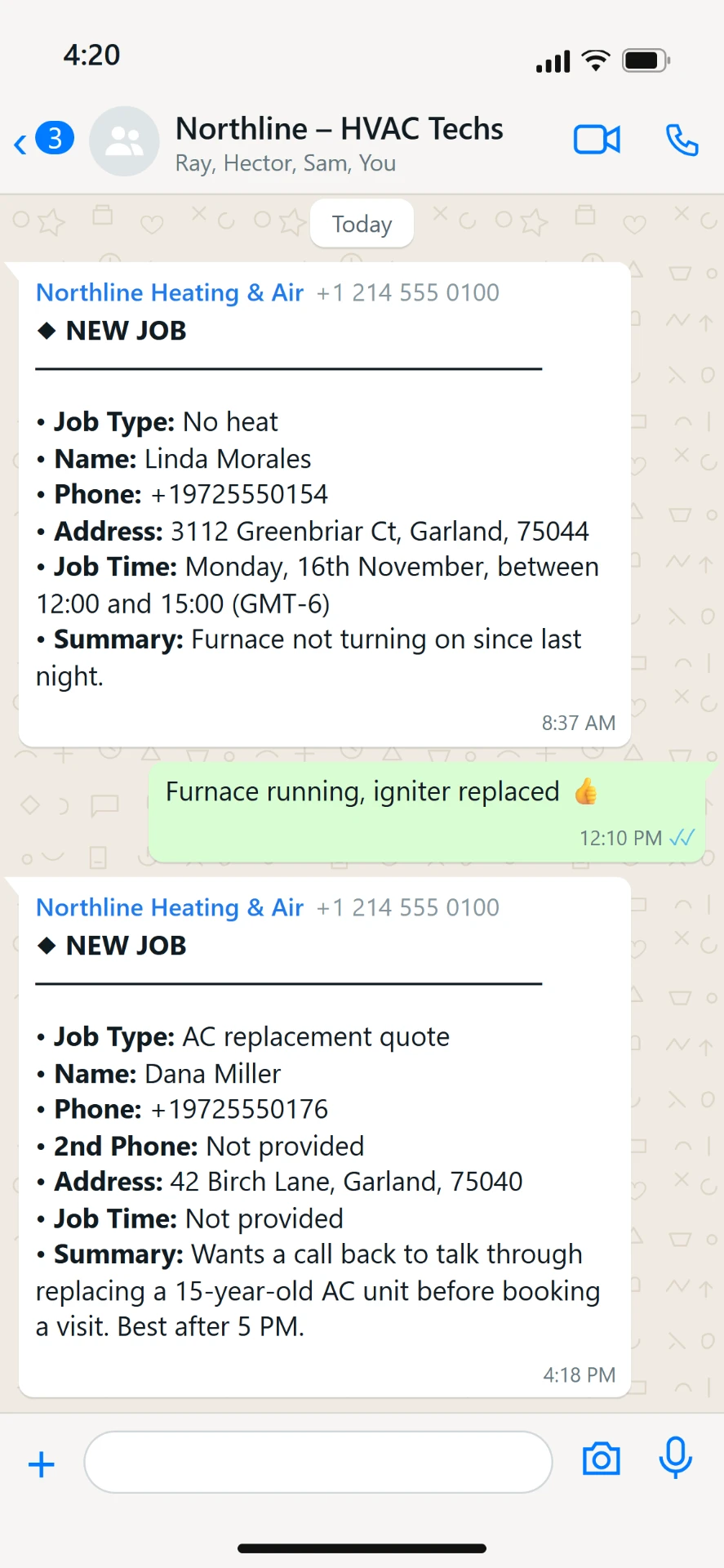
Callback request, example details
What a booked job looks like, trade by trade
Each trade asks different questions before a tech rolls. These come from real calls on our agents:
- Locksmith
house, car or business, then push start or standard key. Locksmith answering service
- Garage door
can the door open and close by hand, or is it stuck. Garage door answering service
- Dryer vent
does it exit through the back wall or the roof, one story or two. Air duct answering service
- Chimney
any strong odors, any smoke backing up into the room. Chimney answering service
- HVAC (from our demo agent, no client calls yet)
heating or cooling, not turning on or running wrong, how old the system is. HVAC answering service
Those answers go into the job summary, so the tech shows up with the right part and the right idea of the job.
Live in less than 24 hours
- Sign up and answer a few questions about your business: trade, hours, service area, the jobs you take. Your part takes a few minutes. We do the rest.
- Add your office and techs' WhatsApp groups. No prompts to write.
- Forward your calls. Every call is recorded and transcribed in the Call2Job app, and booked jobs go to your techs.
Want the CRM too? Sends every call to your CRM through Zapier or a webhook.
See how it worksWhat it costs
Pay per call: $1.20 to $2.00 per answered call, depending on your monthly volume. Calls under 20 seconds don't count. There's a $200 monthly minimum.
One rate for the whole month. Your rate applies to every call that month, not only the calls above the line.
| Calls per month | Price per call |
|---|---|
| Up to 300 | $2.00 |
| Over 300 | $1.70 |
| Over 1,000 | $1.40 |
| Over 3,000 | $1.20 |
Common questions
Can it send the job to my techs' WhatsApp group?
Yes. The moment the call ends, the job goes to your office and to your technicians' WhatsApp group in under 10 seconds, with the job details your techs need. It's built in, with no Zapier or Make to set up.
Can my techs accept a job by replying in WhatsApp?
No. WhatsApp replies are not read by the system. Your team can talk in the group as usual. To send a job again, resend it from the Call2Job dashboard.
How fast does the job reach my techs?
Within seconds of the call ending. The office gets its message in the same window.
Does the office see calls that didn't book?
Yes, if you choose "all calls." Choose "real calls only" and the office group skips spam and empty calls. Those stay in the app.
Does it pick which tech goes?
No. It posts the booked job to the WhatsApp groups set for that agent. You or your crew decide who takes it, and you can resend it from the dashboard.
Does it work with my CRM?
It sends every call to your CRM through Zapier or a webhook. WhatsApp is built in.
Will callers know it's an AI?
When asked, it says it's an AI and keeps helping. You can hear how that sounds in the listening room. Listening room
Can I try it before I pay?
Your first 20 calls cost nothing, for up to 30 days. Card required. Your first charge comes on your 21st call or on day 30, whichever comes first. Cancel before that and you pay nothing.